
01
Expiration risk surfaces too late
Renewals get buried in calendars, inbox reminders, and cells that no one owns until a shift is already at risk.
Workforce compliance for healthcare staffing
Satchel gives staffing agencies one place to see credentials, facility rules, verification work, expirations, and the evidence behind each eligibility decision.
Start with one facility, one role, and a roster export. No PHI is needed to evaluate the workflow.
Shift eligibility
Memorial Hospital · RN
2
Needed
8
Eligible
1
Blocked
Kevin White
RN · Active
Sarah Martinez
RN · Active
Missing NIH Stroke Certification
Best fit for healthcare staffing agencies that have outgrown spreadsheet-led compliance.
Where spreadsheets fall short
Compliance teams need more than a place to store documents. They need to know what is current, which rules apply, what was verified, and why a worker can or cannot be placed.
Renewals get buried in calendars, inbox reminders, and cells that no one owns until a shift is already at risk.
A worker can be ready for one placement and blocked for another. Flat checklists do not explain that difference.
Teams see “not ready” but cannot quickly find the missing requirement, verification result, or rule that caused it.
When evidence and decisions live in separate systems, the audit trail has to be rebuilt after the work happened.
Where Satchel fits
Satchel sits between the credentialing work and the staffing call your team has to stand behind.
How it works
Satchel keeps the steps together that usually live in spreadsheets, inboxes, shared drives, and someone's memory.
Map a CSV or Excel export, validate required fields, and review possible duplicates before records are added.
Create versioned requirement templates by facility, role, and worker type, then activate the right rules.
See expired, expiring, missing, and blocked items early enough for the team to act.
Record the external primary-source check, reviewer, result, notes, and any explicit override.
Apply the facility’s requirements to return Cleared, Conditional, or Blocked with the exact evidence, gaps, and next actions in hours, not days.
SatchelHub monitors incoming VMS requests and prepares a clean candidate profile so that your agency can submit first.
Keep your ATS. Start with the roster export you already have and prove the workflow before scoping deeper integrations.
Guided pilot setupInside Satchel
Views stay close to the work: records, requirements, verification, eligibility, and the evidence you may need later.
Credential readiness
Compliance and staffing see the same live view of credential status, renewals, and records that need attention.
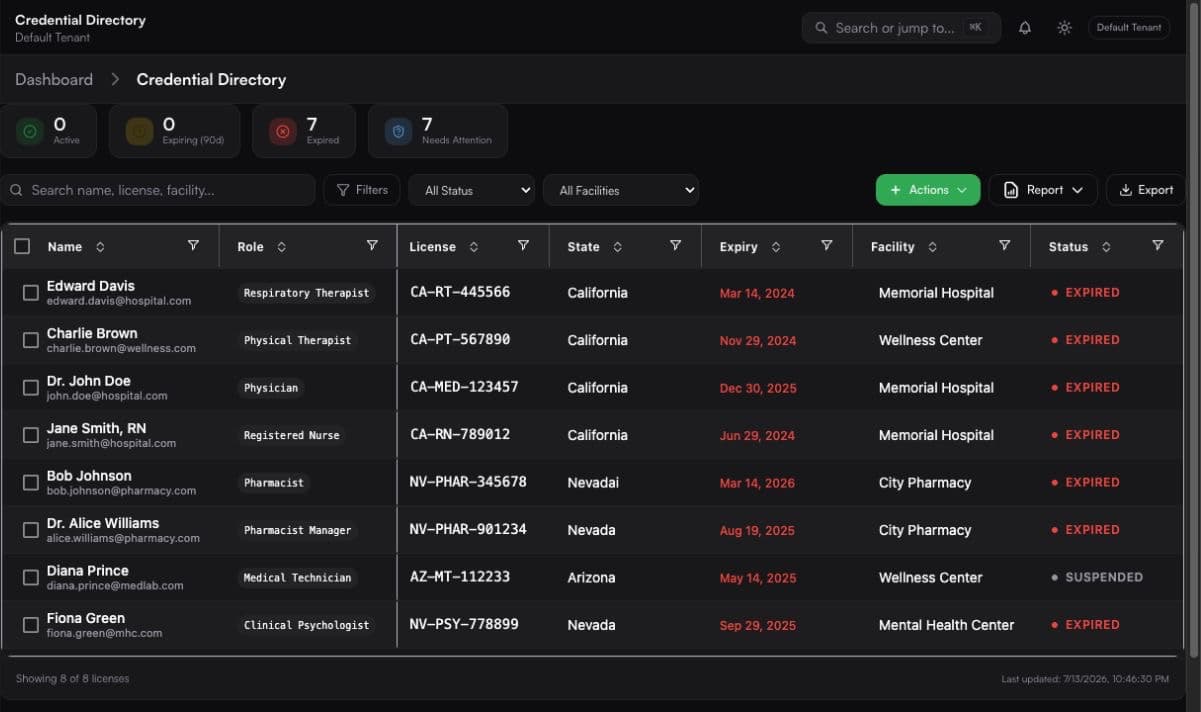
Swipe to inspect the full workspace view.
Facility-aware eligibility
Run the active facility requirements against the shift. Staffing can see who passes and which requirement blocks everyone else.
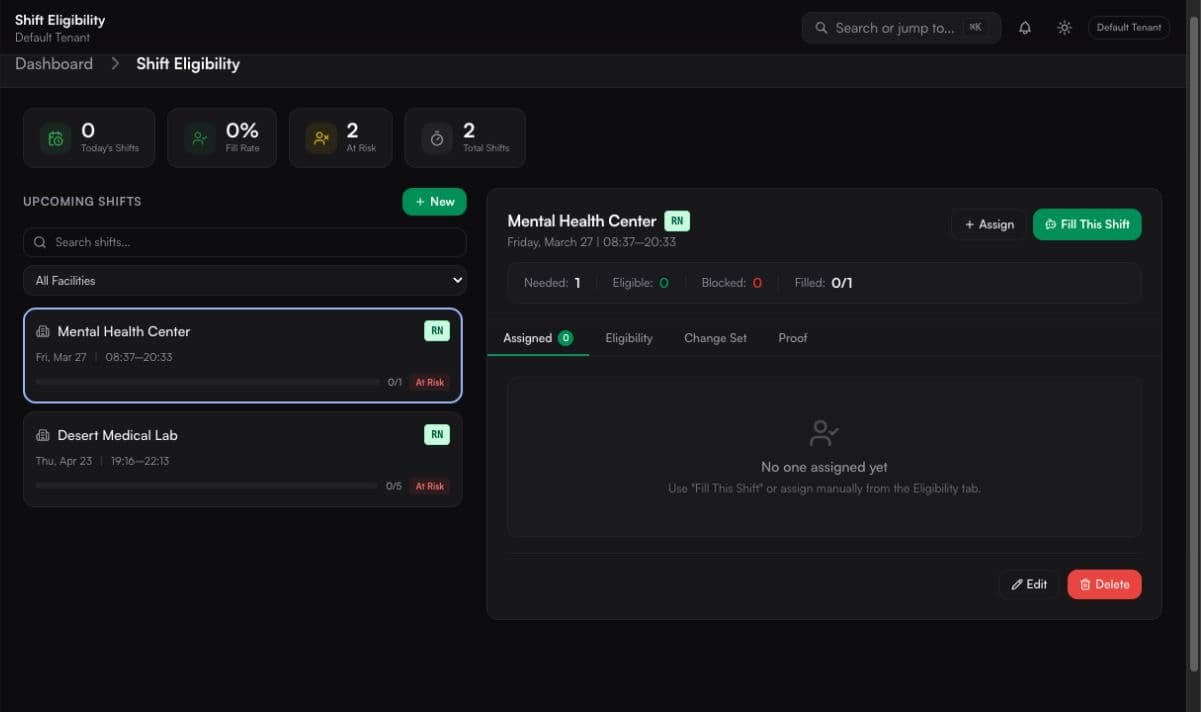
Swipe to inspect the full workspace view.
Verification and evidence
Record manual verification as it happens, keep key staffing decisions on file, and pull a review-ready packet from what's already in Satchel.
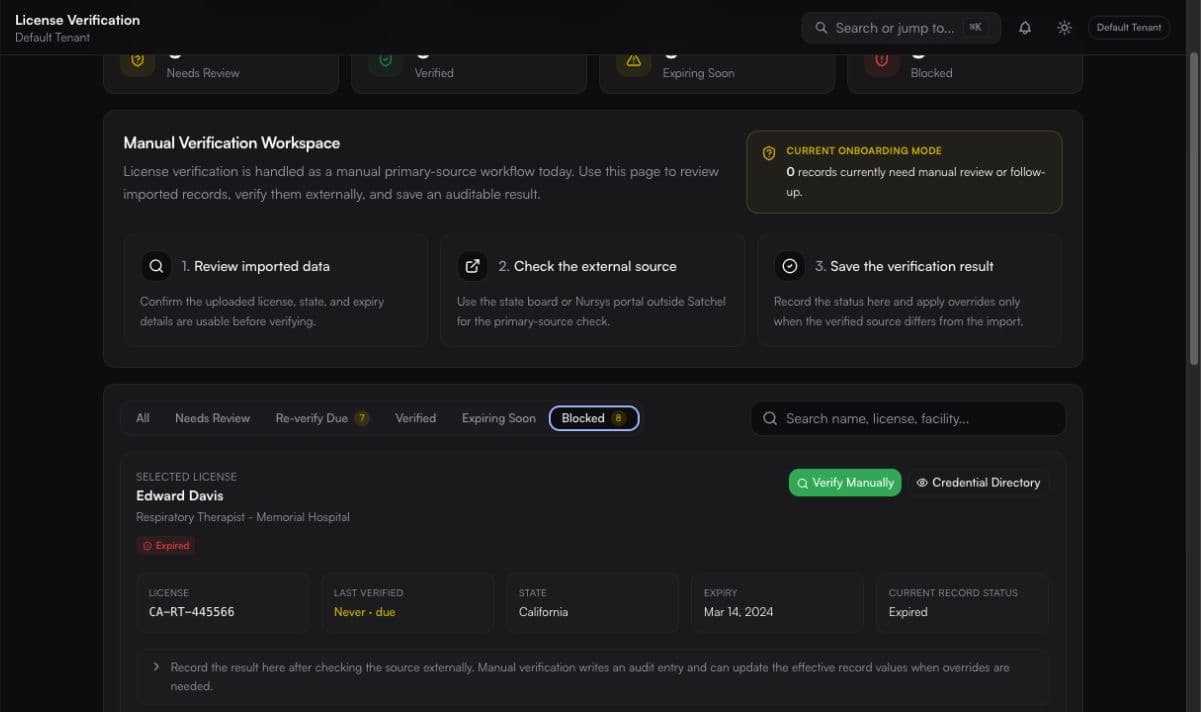
Swipe to inspect the full workspace view.
Built for how agencies work
Each team sees what they need to act. Compliance still owns the rules.
Work the exception queue, record verification, manage rules, and keep the evidence connected to the record.
Own the compliance decision
See who is eligible for a facility and shift without asking compliance to recheck the same file every time.
Staff from a shared status
Understand the credential gaps holding a worker back and route missing information to the right owner sooner.
Make follow-up specific
See credential risk, open coverage, and progress without piecing the workflow together from several systems.
See readiness, not a pile of tabs
Before and after
Not a vague promise of automation. Just a cleaner way to run the compliance work your agency already owns.
Disconnected workflow
With Satchel
Security overview
We document the controls that exist today, then work through security, storage, retention, and BAA needs with you before rollout.
Review security practicesCustomer records and operational data are scoped to the authenticated workspace.
Admin, compliance, staffing, and recruiting roles map to explicit product capabilities.
Key uploads, edits, verification events, assignments, and approvals create traceable records.
Application traffic is transmitted over HTTPS. Data handling and BAA requirements are reviewed before a regulated pilot.
Integrations: Start by importing a real roster. Slack, Microsoft Teams, signed webhooks, calendar feeds, and NPI cross-checks are available. Deeper ATS work is scoped with you, not assumed.
Discuss your stackCommon questions
What's live today, what still needs a person in the loop, and what we scope with you for your agency.
The fastest first scope is one facility, one role, a usable roster export, and the people who own compliance and staffing decisions. Broader timing depends on data quality, users, integrations, and document-storage requirements, so the scope is agreed before the pilot begins.
No. Satchel runs alongside your recruiting and placement system for the compliance work. Start with a roster export, then scope any deeper ATS handoff only after the core workflow is proven.
Not end to end today. A compliance user checks the appropriate external source, then records the result, source, reviewer, notes, and any explicit override in Satchel. That verification history stays connected to the credential record.
Satchel surfaces expired and expiring credentials in the directory and renewals calendar. Configured users can receive in-app and email alerts at 30, 14, 7, and 1 day before expiration, on the expiration day, and in an optional weekly summary.
Yes. Shift eligibility applies the active facility requirement template, any binding overrides, and shift qualifications. The result includes pass or fail status, requirement-level evidence, and clear block reasons before assignment.
Satchel uses tenant-scoped access, role permissions, audit logging, signed sessions, authentication safeguards, and encrypted transport. Before a pilot involving sensitive documents or PHI, the data flow, storage and retention approach, security requirements, and any required BAA are documented.
The current 30-day founding customer pilot is $1,500 for one facility, one role, and up to 250 active clinician records. The fee is credited toward the first annual subscription if you continue, and ongoing pricing is put in writing before the pilot begins.
Free roster risk review
A 30-minute diagnostic for healthcare staffing operators, not a generic software tour.